

Why Server‑Side Rendering (SSR) Is the Quiet Hero of SaaS Technical SEO
When I first joined a fast‑growing SaaS startup, the development team was obsessed with the latest front‑end framework. React, Vue, Svelte—every buzzword was on the table. The marketing crew, meanwhile, was busy crafting the perfect product‑led growth narrative. Somewhere in the middle, I kept hearing the dreaded phrase “Google can’t see our content.” The answer? We were serving a fully client‑side rendered (CSR) experience, and Google’s crawler was getting a blank canvas.
That moment sparked a deep dive into the world of rendering strategies, and what I discovered was a hidden lever that most SaaS companies overlook: Server‑Side Rendering (SSR). Not to be confused with static site generation or simple caching, SSR is about delivering a fully formed HTML document to the browser—and to the search engine bots—right from the server. In this post, I’ll walk you through why SSR matters for SaaS, how to implement it without breaking your product roadmap, and the SEO wins you can expect.
The Rendering Landscape: CSR vs. SSR vs. Hybrid
Before we jump into the “why,” let’s quickly map the terrain. Most modern SaaS platforms are built as single‑page applications (SPAs) that rely on CSR: the server sends a bare‑bones HTML file, JavaScript boots up, and the rest of the page is painted on the client. This approach shines for interactivity, but it also means that the initial HTML payload often contains little more than a <div id="root"> placeholder.
Search engines, however, still need to understand what the page is about before they can rank it. Google’s rendering engine can execute JavaScript, but it’s a costly, two‑step process: first fetch the raw HTML, then spin up a headless browser to run the scripts. This adds latency, consumes crawl budget, and—most importantly—creates a reliability gap. If your JavaScript fails or takes too long, Google may index an empty or partially rendered page.
SSR sidesteps this by pre‑rendering the page on the server, sending a complete HTML document that includes the critical content, meta tags, and structured data. A hybrid approach—often called “incremental static regeneration” or “partial SSR”—lets you render only the high‑value pages (like landing pages, pricing tables, and feature overviews) on the server while keeping the rest of the app as an SPA.
Top Technical SEO Benefits of SSR for SaaS
- Immediate Content Visibility – Search bots see the full page instantly, reducing the risk of “blank” indexation.
- Improved Crawl Efficiency – With content already in the HTML, Google can spend less time rendering, freeing up crawl budget for deeper pages.
- Better Core Web Vitals Scores – First Contentful Paint (FCP) and Largest Contentful Paint (LCP) improve because the browser doesn’t wait for JavaScript to load before displaying meaningful content.
- Enhanced Structured Data Delivery – Embedding JSON‑LD schema directly in the server response ensures that rich snippets appear reliably. (Need a refresher on schema? Check out Unlocking SaaS Growth with Structured Data.)
- Reduced Dependency on Client Resources – Users on slower connections or older devices get a functional page faster, which indirectly boosts dwell time and reduces bounce.
When SSR Makes Sense (And When It Doesn’t)
Not every page in a SaaS product needs SSR. Here’s a quick decision matrix:
| Page Type | SSR Recommendation | Why |
|---|---|---|
| Landing pages, pricing, feature overviews | Strongly recommended | High conversion intent, competitive keywords, SEO priority. |
| Dashboard or logged‑in user area | Optional, often not needed | Content is behind authentication; bots can’t access it anyway. |
| Help center / knowledge base | Recommended | These pages generate long‑tail traffic and often rank for support queries. |
| Blog or news feed | Hybrid (static generation) | Can be pre‑built at publish time, serving both SEO and speed. |
In short, prioritize the pages that drive acquisition, revenue, and support traffic. The rest can stay as CSR to preserve development velocity.
Implementation Blueprint: From Zero to SSR in Six Steps
- Audit Your Current Rendering – Use Log File Analysis to see which URLs Google is actually crawling and how often they’re returning a 200 with a full HTML payload.
- Select an SSR‑Capable Framework – Next.js (React), Nuxt (Vue), and SvelteKit all offer out‑of‑the‑box SSR. Choose the one that aligns with your existing stack.
- Identify High‑Value Routes – Pull a list from your analytics: pages with >5% bounce, high conversion, or strong keyword rankings.
- Configure Server Rendering – For each route, ensure the server fetches the necessary data (via API calls) and injects it into the HTML. Remember to set proper
Cache‑Controlheaders to balance freshness and speed. - Integrate Structured Data – Embed JSON‑LD directly in the SSR response. This guarantees that Google sees your schema without waiting for JavaScript.
- Test, Test, Test – Use the URL Inspection tool in Google Search Console to validate that Googlebot sees the rendered HTML. Also run Lighthouse audits to confirm Core Web Vitals improvements.
SSR Pitfalls and How to Avoid Them
Implementing SSR isn’t a plug‑and‑play solution. Here are common traps and mitigation tactics:
- Data Staleness – Because the server renders the page before sending it, any API latency can slow down response times. Use parallel data fetching and edge caching (e.g., Vercel Edge Functions) to keep latency sub‑second.
- Over‑Rendering – Don’t SSR every single route. Over‑rendering can tax your server infrastructure and dilute crawl budget. Stick to the high‑value list you built in step 3.
- State Hydration Mismatch – Ensure that the client side receives the same data that the server used to render. Mismatched states can cause React warnings and UI flicker.
- Security Concerns – Never expose sensitive API keys or user data in the server‑rendered HTML. Sanitize all output and keep authentication logic server‑side.
Measuring the SEO ROI of SSR
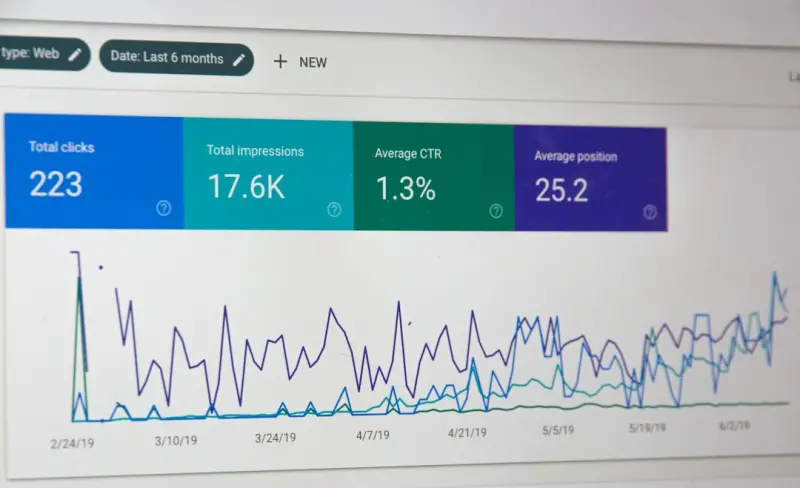
After rollout, the real test is performance. Here’s a simple KPI dashboard you can set up:
| KPI | What to Track | Goal |
|---|---|---|
| Indexed Pages | Number of SSR‑enabled URLs appearing in Google’s index. | +10% within 30 days. |
| Organic Click‑Through Rate (CTR) | CTR for target landing pages. | +5% after rich snippets appear. |
| Core Web Vitals (LCP, FID) | Average scores for SSR pages. | LCP < 2.5 s, FID < 100 ms. |
| Crawl Budget Allocation | Share of crawl budget spent on high‑value pages (via log file analysis). | +15% allocation to SSR pages. |
When you see these metrics move in the right direction, you’ll have tangible proof that SSR is not just a developer vanity metric—it’s a growth lever.
SSR and the Future of SaaS Technical SEO
As AI‑driven search evolves and Google leans more heavily on semantic understanding, the quality of the HTML you serve becomes even more critical. SSR gives you a clean, parse‑friendly foundation that AI can analyze without the noise of runtime JavaScript. In practice, this means better chances of securing featured snippets, FAQ boxes, and even “answer” positions that bypass traditional rankings altogether.
Moreover, the rise of edge computing means you can push SSR closer to the user, marrying the SEO benefits of server‑rendered HTML with the speed advantages of CDN distribution. Think of it as “Edge‑SSR” – a concept we’ll explore in depth in a future post.
Quick Checklist for Your Next SSR Sprint
- ✅ Identify top 10 SEO‑critical pages.
- ✅ Choose an SSR‑compatible framework.
- ✅ Implement server data fetching with parallel calls.
- ✅ Add JSON‑LD schema directly in the HTML response.
- ✅ Set aggressive cache headers for static portions.
- ✅ Validate with Google Search Console’s URL Inspection.
- ✅ Monitor Core Web Vitals and crawl budget shifts.
Implementing SSR may feel like a heavyweight project, but you can treat it as a series of incremental wins. Start with the most valuable landing page, measure the lift, then roll out to the next tier. Before you know it, your SaaS platform will not only be faster for users but also more visible to the search engines that power your organic growth.

Becky Putman is an Ottawa-based freelance writer and marketing professional with a passion for storytelling, animals, and community involvement. She enjoys creating engaging content that informs, inspires, and connects with readers.
Related Posts

Why SaaS PWAs Need a Technical SEO Strategy
Progressive Web Apps offer app‑like experiences for SaaS users, but without proper technical SEO t... Read More
International Technical SEO Playbook for SaaS
A deep dive into the technical steps SaaS businesses need to dominate global search—from hreflang ... Read More

Beyond Speed: A Technical SEO Blueprint for SaaS Platforms
This guide walks SaaS teams through a comprehensive technical SEO strategy—from Core Web Vitals an... Read More
Top Posts

The Shift Towards Authenticity in Social Media Strategy
The shift towards authenticity in social media strategy is a welcome change. Learn how brands can prioritize vulnerability, transparency, and connection to buil...Read More

Mobile SEO: The Key to Unlocking Your Website's Full Potential
Mobile SEO is crucial for your website's success. Learn why and how to optimize for the small screen to improve visibility and rankings....Read More

How Community‑Driven Video Can Supercharge Your SEO
Learn to harness community‑created videos, from technical setup to metadata and linking strategies, turning authentic user content into a powerful SEO engine....Read More

The Evolution of Technical SEO: Navigating the Ever-Changing Landscape
The world of technical SEO is constantly evolving. Learn how to navigate the ever-changing landscape and optimize your website for better online visibility with...Read More
0 Comments
Post Comment
You will need to Login or Register to comment on this post!