
Why Google Discover Is the Secret Weapon SaaS Marketers Have Overlooked
When most SaaS teams think about “Google SEO,” the mental checklist usually reads: keyword research, backlink acquisition, on‑page optimization, and maybe a dash of Core Web Vitals. There’s a whole other surface area on Google that most of us barely skim—Google Discover. It’s a feed that curates content based on user interests, browsing history, and the subtle signals Google gathers from billions of daily interactions. For a SaaS business, cracking the Discover algorithm can turn casual browsers into warm leads without you having to push a paid ad.
What Is Google Discover, and Why Does It Matter for SaaS?
Google Discover is the visual, card‑based feed you see on the mobile Google app and Chrome’s new tab page. It’s not a traditional search results page; it’s a personalized stream that surfaces content before a user even types a query. Think of it as the “Google‑powered Facebook” that lives inside every Android phone and Chrome browser.
For SaaS companies, the value proposition is simple:
- Zero‑click traffic: Users discover your product insights, case studies, or thought leadership without a search query, expanding your reach beyond intent‑driven searches.
- Higher engagement: Discover cards are visually rich, encouraging longer dwell times and higher click‑through rates when the content resonates.
- Top‑of‑funnel lead generation: By delivering educational content that aligns with a prospect’s interests, you nurture them early in the buyer’s journey.
How Google Decides What Shows Up in Discover
Google hasn’t published a definitive “ranking algorithm” for Discover, but the community has pieced together the major signals:
- Freshness: New, timely content tends to perform better. Think of product announcements, industry trends, or fresh case studies.
- Visual appeal: High‑resolution, eye‑catching images (ideally 1200 × 628 px) are a must. Cards without an image rarely get impressions.
- E‑E‑A‑T (Experience, Expertise, Authoritativeness, Trust): Google evaluates the author’s credibility, especially for topics that can affect business decisions.
- User signals: Click‑through rates, dwell time, and bounce rates for existing Discover cards feed back into the system.
- Structured data: While not a direct ranking factor, schema markup helps Google understand the content type, which can boost discoverability. See how structured data can supercharge your SaaS rankings for deeper insight.
Step‑by‑Step Playbook to Get Your SaaS Content into Discover
1. Audit Your Existing Content for Discover‑Readiness
Start by pulling a list of all blog posts, whitepapers, and case studies published in the last six months. Use Google Search Console’s “Discover” performance report to see which pages already appear and which are missing. Identify high‑performing assets that lack the visual or freshness signals and earmark them for a quick revamp.
2. Craft Compelling Hero Images
Every piece of content you want Discover to surface needs a featured image that meets Google’s specifications:
- Minimum width of 1200 px.
- Aspect ratio between 1.91:1 and 1:1 (square works well on mobile).
- Use bold, readable text overlays only if the image remains legible at thumbnail size.
Consider creating a brand‑consistent template that includes your logo subtly placed—this reinforces brand recall without compromising the visual appeal.
3. Optimize Headlines for Curiosity, Not Keywords
Discover is less about exact‑match keywords and more about evoking curiosity. Instead of “SaaS KPI Dashboard Guide,” try “Why 80% of SaaS Leaders Are Missing This KPI.” The goal is to spark a “I need to read this” reaction. However, avoid clickbait; Google penalizes deceptive headlines quickly.
4. Leverage Structured Data for Rich Cards
Adding Article or BlogPosting schema with image, author, datePublished, and publisher fields helps Google pull the right assets for your card. For SaaS products, you can also use Product schema on feature announcement pages to give Google extra context.
For a deeper dive on how to implement schema, revisit the internal guide on How Structured Data Can Supercharge Your SaaS Rankings.
5. Publish Frequently, but Prioritize Quality
Because freshness is a strong signal, aim for a cadence that keeps your content pipeline full—think weekly thought pieces or monthly industry round‑ups. However, the “quality over quantity” rule still applies; a poorly written post with a flashy image will get a low CTR and damage your future Discover eligibility.
6. Monitor Crawl Budget and Indexing
Google Discover relies on the same indexing pipeline as organic search. If you’re overloading Googlebot or have crawl‑budget constraints, your new content might never get a chance to be evaluated for Discover. Review the Crawl Budget Mastery for SaaS Sites guide to ensure Google can efficiently crawl your fresh assets.
7. Use Internal Linking to Signal Relevance
When you publish a new article, link back to older, evergreen pieces that reinforce the same topic cluster. This creates a topical authority web that Google can interpret as a strong signal that your site is an expert on that subject, increasing the likelihood of Discover placement.
8. Track Performance and Iterate
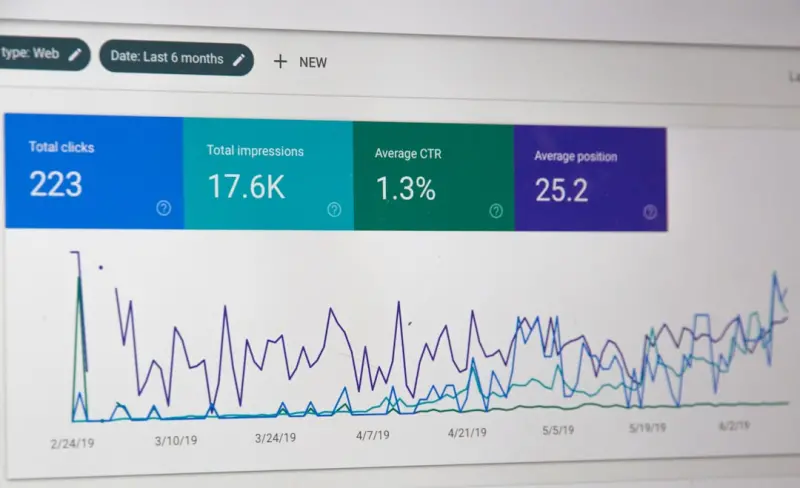
In Search Console, the “Discover” tab offers impressions, clicks, average position, and CTR. Set up a simple dashboard that tracks:
- Impressions per piece (aim for a steady upward trend).
- CTR (benchmark at 4‑6% for SaaS content).
- Average time on page (higher dwell = higher relevance).
Use these metrics to refine your image choices, headline angles, and publishing cadence.
Case Study: Turning a “Product Feature” Blog into a Discover Powerhouse
One of our SaaS clients—an AI‑powered analytics platform—had a modest blog traffic of 5,000 monthly visitors. They decided to test Discover by revamping a post titled “New Real‑Time Dashboard Launch.” Here’s what they did:
- Created a custom hero image featuring a screenshot of the dashboard with a bold overlay: “See Your Data Live, Anywhere.”
- Added
Articleschema with author bio and publication date. - Published the post on a Tuesday morning (historically higher mobile activity).
- Promoted the article internally on LinkedIn, driving a small but immediate traffic spike.
Within two weeks, the post earned 12,000 Discover impressions, a 3.5% CTR, and generated 120 qualified leads—an 8x increase in lead volume compared to the same post’s performance through organic search alone.
Common Pitfalls and How to Avoid Them
- Neglecting Mobile‑First Design: Discover is primarily a mobile experience. If your page loads slowly on mobile, users will bounce, and Google will demote the card.
- Over‑Optimizing for Keywords: A keyword‑stuffed headline looks spammy in a visual feed. Focus on relevance and emotional pull.
- Skipping Image Alt Text: While Discover uses the image itself, alt text still matters for accessibility and can reinforce the topic for Google.
- Ignoring Content Depth: Short, shallow posts rarely keep users engaged. Aim for a minimum of 1,200 words with actionable takeaways.
Integrating Discover Into Your Overall SEO Strategy
Discover shouldn’t replace your core search strategy; it should augment it. Think of it as an “early‑interest” channel that feeds the top of the funnel, while traditional SEO captures intent‑driven traffic deeper in the funnel. Align your content calendars so that every major product announcement, industry insight, or customer success story has a Discover‑optimized version.
Future Outlook: The Rise of AI‑Curated Discover Feeds
Google is increasingly leveraging AI models (like PaLM and Gemini) to understand user intent beyond simple keyword matching. As those models improve, the barrier to entry for Discover will lower—meaning more SaaS brands will get a chance to appear. However, the competition will also intensify, making the quality of images, headlines, and topical authority even more critical.
Bottom Line
Google Discover is a low‑cost, high‑impact channel that many SaaS marketers still ignore. By treating it as a visual SEO discipline—optimizing images, headlines, structured data, and crawl budget—you can unlock a steady stream of qualified leads without increasing ad spend. Start with a content audit, apply the playbook above, and watch your brand appear in users’ feeds before they even think to search.

Becky Putman is an Ottawa-based freelance writer and marketing professional with a passion for storytelling, animals, and community involvement. She enjoys creating engaging content that informs, inspires, and connects with readers.
Related Posts

AI‑Driven SERP Shift: Future‑Proof Your Google Rankings
Google’s AI‑driven SERP reshapes visibility. Learn to adapt with topic clusters, structured data... Read More

Semantic Topic Clusters: Future‑Proofing Your Google SEO
Learn how to build semantic topic clusters that turn isolated pages into an authority‑rich ecosyst... Read More

Mapping Micro‑Moments: A New Blueprint for Google SEO Success
Learn to map micro‑moments to user intent, leverage structured data, and turn fleeting searches in... Read More
Top Posts

Open Source, Open Links: How Contributing Code Fuels Your SEO Authority
Learn how genuine contributions to open‑source projects can earn high‑quality backlinks, boost domain authority, and create a scalable, community‑driven l...Read More

Why 2024 Is the Year eCommerce Becomes an Experience, Not Just a Transaction
2024 reshapes eCommerce into an immersive experience. Learn how mobile‑first design, AI personalization, omnichannel sync, and new tech like AR can boost your...Read More
Voice Search Optimization: The Next Frontier for SaaS SEO
Voice search is reshaping SaaS discovery. Learn practical tactics—schema markup, mobile speed, FAQ integration—to capture spoken queries and turn them into ...Read More

The Future of Social Strategy: How to Stay Ahead in a Rapidly Changing Landscape
The future of social strategy is all about staying ahead in a rapidly changing landscape. Learn how to leverage social media and SEO to improve your online visi...Read More
0 Comments
Post Comment
You will need to Login or Register to comment on this post!