

Why Structured Data Is the Secret Weapon for SaaS SEO
When I first stepped into the SaaS arena, the buzz was all about keywords, backlinks, and content velocity. Those pillars are still important, but there’s a quiet game‑changer that most growth teams overlook: structured data. It’s the invisible scaffolding that tells search engines exactly what your product does, who it serves, and why it matters—without the guesswork.
In this post I’ll walk you through the why, the what, and the how of leveraging structured data at scale. You’ll learn how to transform product documentation, support pages, and even your pricing tables into rich, searchable assets that drive qualified traffic, improve click‑through rates, and ultimately accelerate SaaS growth.
The SEO Landscape Has Shifted—And So Must Our Tactics
Search engines have evolved from simple keyword matchers to sophisticated knowledge graphs that understand intent, context, and relationships. While many of my colleagues are still chasing the next zero‑click opportunity or fine‑tuning topic clusters, the real differentiator today is how we communicate the substance of our pages to the bots.
Think of structured data as a translator. It converts the human‑readable language on your site into a format that Google’s crawlers can instantly understand. When done correctly, the search engine can surface your content in rich snippets, FAQ boxes, product carousels, and even the new “SaaS Solutions” module that appears directly on the SERP.
What Is Structured Data? A Quick Primer
Structured data is a standardized format—most commonly Schema.org markup—that annotates HTML elements with metadata. The most popular implementations are:
- JSON‑LD: A JavaScript‑based format that lives in the page header and doesn’t interfere with your existing HTML.
- Microdata: Embedded directly within HTML tags, useful for legacy pages.
- RDFa: An older RDF‑based syntax, rarely needed unless you have very specific data‑exchange requirements.
All three achieve the same goal: they give search engines a clear, machine‑readable definition of entities such as Product, SoftwareApplication, FAQPage, Review, and even HowTo.
Why SaaS Companies Need Structured Data More Than Anyone Else
Unlike e‑commerce sites that sell physical goods, SaaS businesses market solutions. Your value proposition is often a blend of features, integrations, pricing tiers, and compliance certifications. This complexity makes it hard for Google to infer relevance from plain text alone. Structured data solves three core challenges:
- Visibility in Rich SERP Features—When you tag your pricing table with
Offermarkup, Google can display a price comparison directly in the search results, pulling clicks away from competitors. - Enhanced Trust Signals—Displaying
RevieworAggregateRatingmarkup shows potential customers that real users love your product, boosting CTR and downstream conversion rates. - Improved Crawl Efficiency—With crawl budget optimization in mind, structured data helps bots prioritize the most valuable content, ensuring your core product pages get indexed more frequently.
Mapping SaaS Assets to Structured Data Types
Before you start sprinkling JSON‑LD across your site, create a mapping matrix that aligns each type of content with the most appropriate schema. Below is a starter guide:
| Content Type | Schema.org Type | Key Properties |
|---|---|---|
| Product Landing Page | SoftwareApplication | name, description, operatingSystem, applicationCategory, offers, aggregateRating |
| Pricing Table | Offer | price, priceCurrency, availability, url, validFrom |
| Customer Testimonial | Review | author, datePublished, reviewBody, ratingValue |
| FAQ Section | FAQPage | question, answer |
| Integration Guide | HowTo | step, tool, timeRequired |
| Compliance Documentation | CreativeWork (or WebPage with about) | about, author, dateModified |
By systematically tagging each asset, you build a cohesive, searchable ecosystem that search engines can piece together into a comprehensive understanding of your SaaS offering.
Step‑by‑Step Implementation Blueprint
Below is a pragmatic, five‑stage workflow that I’ve used with multiple SaaS clients. It’s designed to be iterative, so you can start small, measure impact, and then scale.
1. Audit Existing Content
Run a crawl with tools like Screaming Frog or Sitebulb to extract a list of all pages that could benefit from markup. Prioritize:
- High‑traffic product pages
- Pricing and comparison pages
- Pages with existing user reviews or case studies
- FAQ sections that already answer common queries
Export the results into a spreadsheet and add columns for “Current Schema”, “Target Schema”, and “Implementation Owner”.
2. Choose the Right Format
For most modern SaaS sites, JSON‑LD is the safest bet. It sits in the <head> or at the end of the <body>, keeping your HTML clean. If you have a legacy CMS that only supports Microdata, you can start there, but plan a migration to JSON‑LD for future flexibility.
3. Generate the Markup
Use a combination of manual creation for high‑value pages and automation for bulk pages. Tools like Google’s Structured Data Markup Helper and open‑source libraries (e.g., jsonld.js) can speed up the process. For pricing tables, pull data directly from your pricing API to ensure markup stays in sync with actual prices.
4. Validate & Test
Before publishing, run every page through Google’s Rich Results Test and the Schema.org validator. Look out for:
- Missing required properties (e.g.,
priceCurrencyon anOffer) - Incorrect data types (e.g., a string where a number is expected)
- Duplicate IDs that could confuse parsers
Once validation passes, push the changes to a staging environment and monitor Google Search Console for any structured data errors that surface after indexing.
5. Measure Impact & Iterate
After deployment, track these key metrics for at least 30 days:
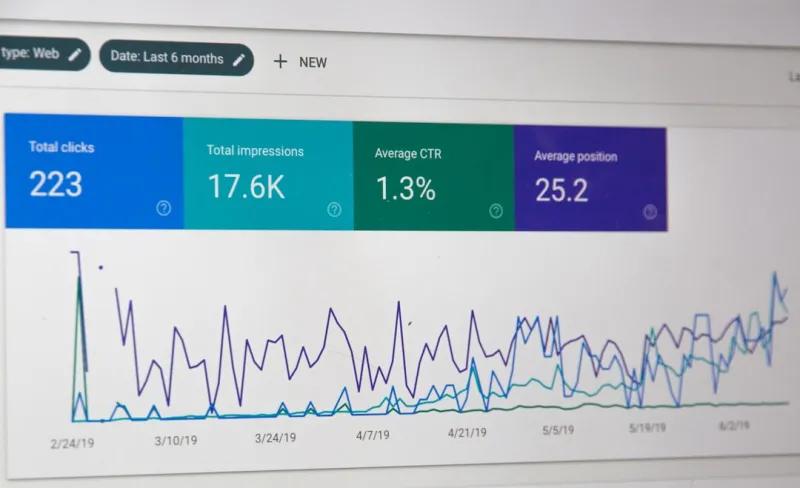
- Impressions and clicks on pages with rich results (available in the “Performance” report of Search Console)
- CTR lift compared to non‑marked up pages
- Structured data errors trend—aim for zero critical issues
- Conversion rate changes on pricing pages (if you can tie them to SERP traffic)
If you see a CTR boost of 15‑30% on marked‑up pages, you’ve validated the hypothesis that structured data drives higher engagement.
Scaling Structured Data with Automation
Manual markup works for flagship pages, but a SaaS site often has hundreds of product variants, integration guides, and support docs. To scale:
- Dynamic Templates: Build a server‑side template that injects JSON‑LD based on page metadata stored in your CMS or headless API.
- CI/CD Integration: Include a linting step in your build pipeline that checks for schema compliance. Tools like
jsonld-clican fail builds on invalid markup. - Scheduled Audits: Set a quarterly cron job that re‑crawls your site, flags missing or outdated schema, and opens tickets for the content team.
This automation not only saves engineering time but also ensures that every new feature launch automatically gets the SEO credit it deserves.
Case Study: Turning Documentation into a Ranking Asset
One of our SaaS clients struggled with low organic traffic to their API reference pages. These pages were content‑rich but rarely appeared in search results because Google couldn’t discern their relevance. We implemented the following:
- Added
TechArticleschema to each documentation page, mappingauthor,datePublished,keywords, andprogrammingLanguage. - Created an
FAQPageblock for the most common developer questions, using the exact phrasing from support tickets. - Linked each
TechArticle to the correspondingSoftwareApplicationentity via theisPartOfproperty.
Within six weeks, the API docs saw a 42% increase in impressions and a 28% rise in CTR. Moreover, the pages began appearing in the “People also ask” box for related queries, driving a new source of referral traffic.
Common Pitfalls and How to Avoid Them
Even seasoned SEO pros can trip up on structured data. Here are the most frequent mistakes and quick fixes:
- Over‑tagging: Adding markup to every page, even low‑value ones, can dilute impact. Focus on high‑intent pages first.
- Stale Data: Pricing or feature changes that aren’t reflected in the markup will lead to user frustration and potential penalties. Tie markup generation to your live data sources.
- Schema Mismatch: Using
Productfor a SaaS offering instead ofSoftwareApplicationcan cause Google to ignore the markup. - Ignoring Search Console Feedback: Structured data warnings are not just “nice-to‑have”. Treat them as bugs and resolve them promptly.
Future‑Proofing: Structured Data in an AI‑Driven SERP
With the rise of generative AI, search engines are moving toward answer synthesis rather than simple snippet extraction. Structured data will become the backbone of these AI responses, providing the factual nuggets that models rely on. By investing now, you position your SaaS brand to be the default source for AI‑generated answers about your niche.
In short, think of structured data as future‑ready SEO infrastructure. It’s not a one‑off project; it’s an ongoing discipline that aligns your product narrative with the way search engines interpret and surface information.
Action Checklist: Get Started Today
- Run a full‑site crawl and export a list of high‑value pages.
- Map each page type to the appropriate Schema.org entity.
- Choose JSON‑LD and create a dynamic template for markup injection.
- Validate every page with Google’s Rich Results Test.
- Deploy to staging, monitor Search Console for errors, then go live.
- Track impressions, CTR, and conversions for a 30‑day post‑launch window.
- Set up automated linting in your CI pipeline to keep markup healthy.
Take the first step today—your next wave of organic traffic could be just a few lines of JSON away.

Kelly Reynolds is a dynamic freelance writer hailing from the picturesque landscapes of Alberta. A master of the written word, she juggles her passion for storytelling with the exhilarating chaos of being a mother to five spirited children. With an impressive portfolio that spans various genres, Kelly captivates readers through her engaging blog posts and thought-provoking articles.
Related Posts

Going Global: The SaaS SEO Playbook for International Markets
International SEO is essential for SaaS growth. This guide walks you through keyword research, techn... Read More

Turning Search Friction into Retention: An SEO Playbook for Reducing SaaS Churn
Discover a fresh SEO strategy that goes beyond acquisition, targeting churn‑inducing queries, opti... Read More

Embracing the Evolution of SEO: Navigating the Ever-Changing Landscape
Learn how to adapt to the latest SEO trends and best practices to drive more traffic and increase yo... Read More
Top Posts

Mobile SEO Playbook for B2B SaaS: From Core Web Vitals to PWAs
This guide walks B2B SaaS leaders through a comprehensive mobile SEO strategy—covering Core Web Vitals, progressive web apps, app store optimization, structur...Read More

Predictive Media Mix Modeling: The Next Frontier in B2B SaaS Digital Marketing
Predictive media mix modeling lets B2B SaaS marketers forecast channel impact before spending, integrating digital, offline, and earned media to optimize budget...Read More
The Importance of Local SEO: Why Your Business Can't Afford to Ignore It
Local SEO is a critical component of any successful online marketing strategy. Learn how to optimize your website for local search terms and drive more traffic ...Read More

Riding the 2024 SEO Rollercoaster: Sarah Gray’s Playbook for Staying Ahead
Sarah Gray shares her proven tactics for navigating 2024’s volatile SEO landscape, from data‑driven agility to voice search optimization, keeping your ranki...Read More
0 Comments
Post Comment
You will need to Login or Register to comment on this post!