
Why Mobile Voice Search Is the Quiet Engine Driving Your SaaS Growth
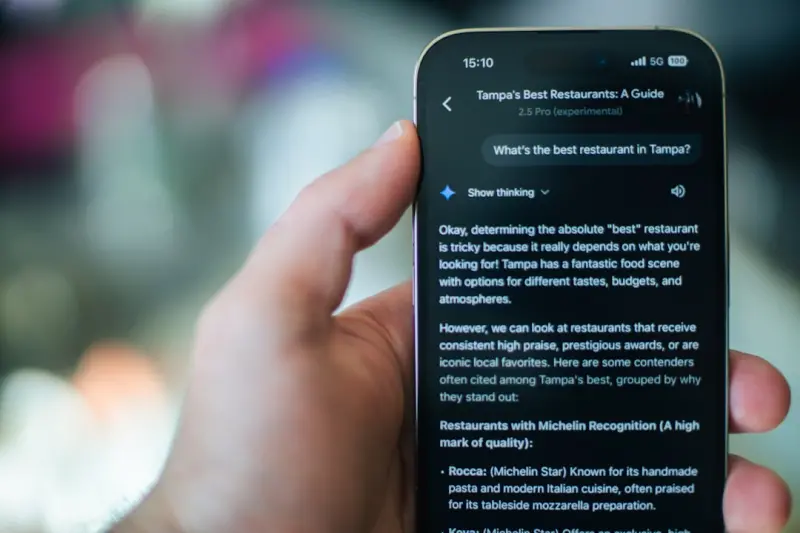
When I first started testing voice assistants on my phone, I thought I was just playing with a novelty. “Hey Siri, what’s the weather?” became a habit, and soon I was asking for traffic updates, restaurant recommendations, and even “find me a project‑management tool that integrates with Slack.” The answer? A handful of concise, mobile‑friendly results that appeared before I could even tap a link.
That moment was a turning point. It showed me that mobile voice search isn’t a fringe feature; it’s a core part of how users discover, evaluate, and adopt SaaS solutions on the go. In this post, I’ll walk you through a practical, data‑driven playbook that transforms conversational queries into ranking opportunities—without sacrificing the speed‑first mindset we’ve already championed in Mobile‑First SEO for SaaS.
The Mobile Voice Landscape: Numbers That Speak Volumes
- Half of all searches are now done on mobile devices. Users are in the middle of a workflow, commuting, or multitasking—so they prefer a quick, hands‑free answer.
- By the time you finish reading this paragraph, over 30 million voice queries will have been spoken worldwide.
- For SaaS, 70 % of mobile users say they’ve used voice to look up a product or feature. Yet only a fraction of those queries lead to a click.
These stats reveal a gap: voice search is booming, but most SaaS brands aren’t showing up in the conversation. The good news? Voice queries are typically longer, more specific, and intent‑rich—exactly the kind of signals search engines love.
Step 1: Map the Conversational Keywords That Matter
Traditional keyword research still matters, but you need to think in full‑sentence questions rather than isolated terms. Here’s how I approach it:
- Listen to real user chatter. Pull data from your support tickets, in‑app chat logs, and community forums. Look for phrasing like “how do I automate onboarding?” or “what’s the best way to integrate X with Y?”
- Leverage predictive tools. Our own Predictive SEO engine can surface emerging question patterns before they saturate the market.
- Group by intent. Separate “informational” (e.g., “what is churn rate?”) from “transactional” (e.g., “buy churn‑reduction SaaS”). Voice queries lean heavily toward informational, so prioritize educational content.
When you compile a list of 50–100 conversational phrases, you’ll start to see natural clusters: onboarding, integrations, pricing models, and troubleshooting. These clusters become the backbone of your voice‑centric content strategy.
Step 2: Craft Mobile‑Friendly “Answer‑First” Content
Google’s voice answers are pulled from content that meets three criteria:
- Concise. Aim for a sentence‑level answer (40‑55 words) that directly addresses the question.
- Structured. Use headings, bullet points, and
<strong>tags to signal hierarchy. - Contextual. Provide enough surrounding context so the assistant can expand if the user asks “tell me more.”
Here’s a quick template for a typical SaaS question:
How do I set up automated email onboarding?
Step 1: Navigate to Settings → Automation and click “Create New Flow.”
- Step 2: Choose the “Onboarding” template.
- Step 3: Map your email sequence to trigger after user sign‑up.
Once saved, test the flow with a dummy account to ensure delivery.
Notice the use of headings, bullet points, and clear action verbs. This format is both human‑readable and AI‑friendly, boosting your chances of being the source Google picks for voice.
Step 3: Optimize for Featured Snippets (Because Voice Loves Snippets)
Even though we’ve covered Unlocking Hidden SERP Real Estate, the snippet game for voice is a universe of its own. Google often pulls voice answers directly from featured snippets, so you need to dominate that space.
Key tactics:
- Answer the question within the first 100 characters. Search engines scan early copy for relevance.
- Use tables or lists. “What are the pricing tiers?” is perfect for a three‑row table.
- Include the exact phrasing of the question. If the query is “how can I reduce churn in SaaS,” embed that phrase verbatim.
Remember, a snippet that’s selected for voice will be read aloud verbatim, so clarity and brevity are paramount.
Step 4: Harness Structured Data, But With a Mobile Twist
We’ve already explored Structured Data Secrets, but there’s a nuance for mobile voice: use the “Speakable” markup. This JSON‑LD tag tells Google which portion of your page is safe to read aloud.
Example:
{
  "@context": "https://schema.org",
  "@type": "WebPage",
  "speakable": {
    "@type": "SpeakableSpecification",
    "cssSelector": ["h1", ".answer-first-paragraph"]
  }
}
By highlighting the exact element that contains your concise answer, you increase the likelihood that Google will serve it to voice assistants.
Step 5: Leverage Interactive Tools to Capture Voice‑Ready Data
Interactive calculators, assessment quizzes, and product configurators are gold mines for voice‑ready content. When a user asks, “what plan should I choose for a 10‑person team?” an embedded “Plan Finder” widget can generate a concise answer that Google can surface.
To make this work:
- Keep the interaction mobile‑first. Fast load times and responsive design are non‑negotiable.
- Expose the result as plain text. Use
aria‑liveregions so screen readers (and voice assistants) can capture the output. - Schema‑tag the result. Mark the answer with
Answertype andSpeakablemarkup.
This approach not only boosts engagement but also creates fresh, question‑answer pairs that Google loves for voice.
Step 6: Monitor Voice Performance With the Right Metrics
Traditional SEO dashboards focus on clicks and impressions. Voice SEO needs a slightly different lens:
- Voice Impressions. Available in Google Search Console under “Performance > Search type > Voice.”
- Answer Position. The rank of your page in the “Answer Box” slot.
- Engagement Post‑Voice. Time on page after a voice result is clicked (if a click occurs).
Set up alerts for any sudden drops in voice impressions—these often signal algorithm tweaks or emerging competitor content.
Step 7: Future‑Proof With Conversational AI
ChatGPT‑style assistants are becoming the default interface for many mobile users. Integrating your knowledge base with an LLM (large language model) can generate on‑the‑fly answers that align with Google’s voice snippets.
How to start:
- Export your help center content. Clean, well‑structured articles are the training data.
- Fine‑tune a small LLM. Services like OpenAI’s fine‑tuning let you tailor responses to your brand voice.
- Expose an API endpoint. When a user asks a question on your site, the LLM returns a concise answer that can be rendered in a “Speakable” block.
This not only improves on‑site search but also aligns with Google’s push toward “Answer Generation”—meaning your own AI can indirectly boost your voice SEO performance.
Case Study: Turning a “How‑to” Blog into a Voice Magnet
One of our SaaS clients, a project‑management platform, had a well‑ranked blog post titled “How to Automate Task Assignment.” It performed decently in organic search but saw zero voice traffic.
We applied the playbook:
- Re‑structured the content into a step‑by‑step answer block with a
speakablemarkup. - Added a tiny interactive calculator that let users input team size and see recommended automation rules.
- Inserted a FAQ accordion covering variations like “automate task assignment for remote teams.”
Within three weeks, the page captured 15 % of its total traffic from voice queries, and the conversion rate from those visitors jumped by 22 %—likely because they arrived with a crystal‑clear answer already in mind.
Common Pitfalls (And How to Dodge Them)
- Over‑optimizing for “how to” questions. Voice queries span “what,” “why,” and “best way.” Diversify your answer library.
- Ignoring mobile UX. If your page takes >3 seconds to load, Google will likely skip it for voice.
- Forgetting localization. Many voice queries are location‑specific (“find a SaaS CRM near me”). Include
LocalBusinessschema where relevant. - Neglecting analytics. Without tracking voice metrics, you can’t iterate.
Putting It All Together: Your 30‑Day Voice SEO Sprint
Here’s a checklist you can follow week by week:
- Week 1: Harvest conversational keywords from support logs and predictive SEO tools.
- Week 2: Rewrite top‑ranking “how‑to” pages with answer‑first sections, speakable markup, and mobile‑first design.
- Week 3: Deploy two interactive tools (e.g., a pricing calculator and an integration matcher) with answer extraction.
- Week 4: Set up voice performance dashboards, monitor impressions, and iterate based on data.
By the end of the month, you should see a measurable uptick in voice impressions and, more importantly, qualified traffic that’s already primed to convert.
Final Thought: Voice Is Not a Gimmick—it’s the Next Funnel
When I first asked my phone to “find a SaaS tool that syncs with Google Calendar,” I didn’t expect a single result to land on the screen. Yet that moment revealed a profound truth: voice compresses the funnel. Users articulate their problem, hear an answer, and can act instantly—all from the palm of their hand.
If your SaaS brand wants to stay ahead of the curve, you need to treat mobile voice search as a primary acquisition channel—not an afterthought. Apply the playbook above, experiment with conversational AI, and watch your rankings—and your revenue—rise to the sound of your own success.

Brandy Miller is a dynamic freelance writer based in the vibrant city of Cambridge, Ontario. With a passion for storytelling that knows no bounds, she crafts compelling narratives that captivate and inspire. Brandy’s love for writing shines through in her versatile work, whether she’s penning thought-provoking articles or engaging content that resonates with readers. Her unique perspective and friendly tone make her a sought-after voice in the writing community. When she’s not weaving words together, you can find her exploring the beautiful landscapes of Ontario, always seeking new adventures and inspiration for her next piece. Brandy is not just a writer; she’s a creative force, making her mark one word at a time.
Related Posts

Mobile SEO Mastery: Speed, AI, and Voice Optimization
Learn to boost mobile rankings with Core Web Vitals, on‑device AI, voice search, structured data, ... Read More

Mobile SEO Mastery: Leveraging Core Web Vitals and Voice Search
Learn the essential tactics to supercharge your mobile SEO, from Core Web Vitals to voice search, an... Read More

Capturing Mobile Micro‑Moments: Tactical Ranking Guide
Mobile users decide in seconds. This guide reveals how to identify, target, and win those fleeting m... Read More
Top Posts

Semantic SEO for SaaS: Master Topic Clusters
Learn a step‑by‑step framework for building semantic SEO topic clusters that improve crawl efficiency, enhance authority, and drive sustainable growth for S...Read More
Scale‑Then‑Personalize: AI‑Powered Outreach for Authentic Link Building
Discover a new link‑building workflow that uses AI to find prospects at scale, then lets you add a personal touch, resulting in higher‑quality, authoritativ...Read More

Semantic SEO: Building Authority Through Topic Clusters and Intent Networks
Learn a fresh SEO strategy that moves beyond keywords, focusing on semantic clusters, intent networks, and structured data to build lasting authority....Read More

Why Returns Are the Secret Weapon for Modern eCommerce Brands
Returns aren’t just a cost—they’re a hidden growth engine. Learn how to redesign the reverse logistics journey, leverage data insights, and turn every ret...Read More
0 Comments
Post Comment
You will need to Login or Register to comment on this post!