

Microservice‑Ready Technical SEO: Keeping Your SaaS Visible at Scale
When I first joined a fast‑growing SaaS startup, the engineering team was thrilled to split their monolith into a fleet of microservices. The product was finally able to ship new features every two weeks, and our latency numbers looked like a dream. Then the SEO team whispered, “Our rankings are wobbling.” I quickly realized that the very architecture we celebrated for agility can also become a minefield for search engines. This post is my deep‑dive into the hidden technical SEO challenges that emerge when you go micro‑service‑centric—and, more importantly, how to tame them without sacrificing the benefits of a distributed system.
Why Microservices Change the SEO Game
At first glance, a microservice architecture (MSA) looks harmless to Google: each endpoint is still a URL, after all. But the reality is far more complex. In a monolith, you typically have a single robots.txt, a unified sitemap, and a consistent URL schema. With dozens of services, you often end up with:
- Multiple subdomains or paths that serve different parts of the same product experience.
- Inconsistent HTTP headers (caching, security, content‑type) across services.
- Fragmented internal linking because each service owns its own navigation.
- Varying response times that can hurt Core Web Vitals on some pages while others shine.
Search engines treat each of those signals as a piece of the ranking puzzle. When they start seeing a patchwork, they may deem parts of your site low‑quality or, worse, fail to crawl crucial pages altogether.
Mapping the Service Landscape: An SEO‑First Inventory
The first step is to create a single source of truth for all public‑facing endpoints. I like to think of it as an SEO service map—a spreadsheet that lists every service, its domain or sub‑path, the primary content type, and the responsible team. Include columns for:
- URL pattern (e.g.,
docs.example.com/api/*) - Canonical tag status
- Cache‑control header
- Response time (TTFB & fully loaded)
- Related sitemap entry
Having this map lets you spot anomalies at a glance. For instance, you might discover that the billing service returns a 200 OK for a /404 page because its default error handling isn’t wired to the correct HTTP status code. Such oversights can create “soft 404s” that dilute your crawl budget and hurt rankings.
Unified robots.txt and Sitemap Strategy
Search engines fetch robots.txt from the root of each host. If you spread your SaaS across multiple subdomains (e.g., app.example.com, api.example.com, support.example.com), you need a coherent policy across all of them. I recommend a centralized robots.txt generator that each service references via a shared configuration file. This way you can:
- Globally disallow admin panels, staging routes, and internal APIs.
- Allow crawlers to access documentation and marketing pages served from different services.
- Maintain a single point of truth for future domain changes.
Similarly, instead of scattering sitemaps, consolidate them into a sitemap_index.xml that points to service‑specific sitemaps. This approach mirrors the best practices outlined in crawl budget strategies, ensuring that Google can efficiently discover and prioritize high‑value pages across your ecosystem.
Canonical Tags: The Glue That Holds Duplicate Content Together
Microservices often expose the same content under different URLs—for example, a feature overview might be reachable via app.example.com/features/x and www.example.com/features/x. Without a clear canonical declaration, Google may treat these as duplicate pages, splitting link equity. To avoid this, enforce a canonical policy at the edge (CDN or reverse proxy) that injects a <link rel="canonical"> pointing to the preferred URL.
Be vigilant with dynamic parameters. If your analytics service appends ?utm_source=… or ?ref=partner, either strip them before the response or add a rel="canonical" that excludes the parameters. Consistency here prevents the “duplicate content” penalty and helps consolidate ranking signals.
Header Hygiene: Caching, Security, and Language
Each microservice may have its own set of HTTP headers, and that’s fine—provided they’re not contradictory. Common pitfalls include:
- Cache‑Control conflicts: One service serves HTML with
no‑cachewhile another serves static assets with aggressive caching. This can cause crawlers to waste time re‑fetching pages that should be cached. - Content‑Security‑Policy (CSP) mismatches: Inconsistent CSP can block Googlebot from loading essential scripts, resulting in incomplete rendering.
- Vary header misuse: Over‑using
Vary: *tells crawlers that every request is unique, blowing up crawl budget.
Standardize a header baseline in your API gateway or CDN configuration. Document the required headers in your SEO service map and run automated tests (e.g., using curl or Lighthouse CI) to catch regressions before they go live.
Core Web Vitals at Scale: Not Just a Monolith Problem
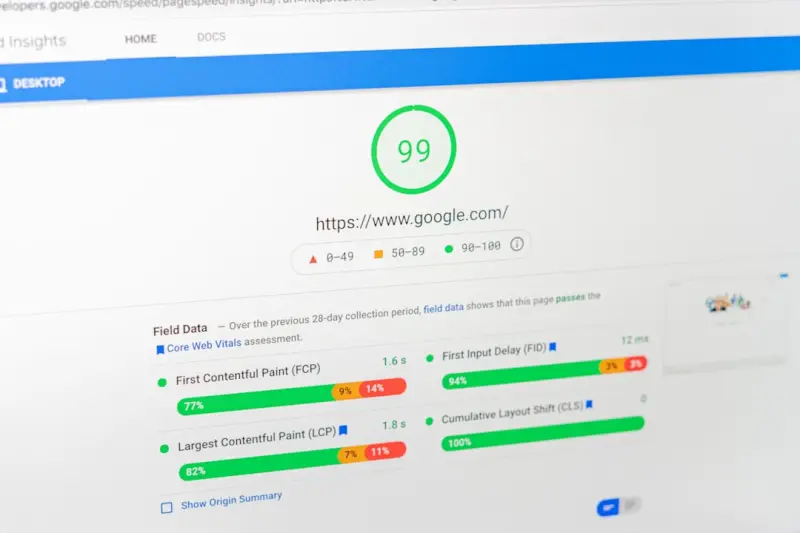
Google’s Core Web Vitals (LCP, FID, CLS) are now ranking signals, and they’re evaluated per‑page. In a microservice world, one service might deliver lightning‑fast JSON responses, while another struggles with heavy JavaScript bundles. The result? A site that looks great in aggregate but has “black holes” of poor performance that drag down overall SEO health.
To monitor this:
- Integrate Web Vitals reporting into your telemetry stack (e.g., using
web-vitalslibrary with your frontend framework). - Set up alerts for any service that exceeds LCP thresholds (>2.5 s).
- Use a service‑level performance budget alongside your engineering SLAs.
When you catch a slow‑loading checkout page early, you prevent a cascade of user‑experience and SEO fallout.
International Targeting and hreflang Across Services
Many SaaS products serve a global audience. With microservices, each region‑specific version of a page may live on a different subdomain (e.g., fr.example.com, de.example.com) or even a separate service. Implementing hreflang correctly becomes a coordination challenge.
My approach is to generate hreflang tags from a centralized language matrix. The matrix maps page identifiers to language‑region variants, and the rendering layer (or edge logic) injects the appropriate tags at request time. This ensures that Google can understand the relationship between French, German, and English versions, preventing duplicate content issues and guiding users to the right locale.
Structured Data: Turning Service‑Specific Content Into SEO Gold
Microservices often expose unique content types—API reference pages, release notes, or onboarding tutorials. These are perfect candidates for structured data that can earn rich results. However, because each service owns its own templates, you might find that only a handful of pages include JSON‑LD markup.
Standardize a structured-data library that all services import. Populate it with schema.org types that align with SaaS content, such as SoftwareApplication, FAQPage, and HowTo. A recent internal case study showed that adding structured data for FAQs boosted organic traffic by 18% within a month.
Internal Linking in a Distributed World
Good internal linking distributes link equity, helps crawlers discover deep pages, and improves user navigation. In a monolith, you can rely on a site‑wide navigation component. In an MSA, each service may render its own navigation, leading to siloed link structures.
To break down those silos:
- Implement a global link registry—a JSON file or API that lists the most important pages across services.
- Use that registry to dynamically populate sidebars, footers, and related‑content sections, ensuring that every page gets at least a few high‑authority inbound links.
- Run a periodic link audit with tools like Screaming Frog to catch orphaned pages.
Managing Crawl Budget with Distributed Endpoints
Even if you’re not explicitly targeting crawl budget, Google allocates it based on site health and authority. When you spread content across many subdomains, Google treats each as a separate “site” for budget purposes. That can dilute the amount of crawl time each service receives.
Consolidate where possible—use sub‑paths instead of subdomains unless you have a compelling reason (e.g., legal or branding constraints). For truly separate subdomains, consider cross‑subdomain linking and consistent sitemap_index.xml entries to signal that they belong to the same brand. This strategy aligns with the recommendations from crawl budget strategies and helps Google allocate more resources to your high‑value pages.
Testing and Monitoring: The DevOps‑SEO Loop
Finally, embed SEO checks into your CI/CD pipeline. Automated tests should verify:
- Presence and correctness of
robots.txtandsitemapentries. - Valid
canonicaltags on all HTML responses. - No 4xx/5xx responses for public URLs.
- Core Web Vitals within thresholds using Lighthouse CI.
- Proper structured data markup (via schema.org validation).
When a new microservice goes live, these tests catch SEO regressions before they affect real users. Pair this with a monitoring dashboard that surfaces crawl errors from Google Search Console and performance alerts from your telemetry stack. The result is a feedback loop where developers and SEO specialists move in lockstep—exactly the rhythm we need in a microservice‑first world.
Conclusion: Turning Microservice Complexity Into SEO Strength
Microservices empower SaaS teams to ship fast and scale efficiently, but they also introduce a labyrinth of technical SEO considerations. By establishing a unified SEO service map, standardizing robots.txt, sitemaps, canonical tags, and headers, and by weaving structured data and internal linking into every service, you can transform that labyrinth into a well‑lit pathway for both users and search engines.
Remember, SEO is not a one‑time setup; it’s an ongoing partnership between engineering, product, and content. When you treat SEO as a first‑class citizen in your microservice architecture, you’ll not only protect your rankings—you’ll also unlock new growth opportunities that only a robust, search‑friendly foundation can deliver.

When it comes to the world of blogging and writing, Rose DesRochers is a name that stands out. Her passion for creating quality content and connecting with her audience has made her a trusted voice in the industry. Aside from her skills as a writer and blogger, Rose is also known for her compassionate nature.
Related Posts

Edge‑First SEO: Turning CDN Power into a Ranking Advantage
Discover practical steps to turn your CDN into an SEO asset, from optimizing cache headers and using... Read More

Crawl Budget Mastery: Turning Log Data into SEO Gold
Discover how to harness server logs, refine robots.txt, and optimize modern architectures to boost y... Read More

Why Real‑Time Data Needs Its Own SEO Playbook
Why Real‑Time Data Needs Its Own SEO Playbook When I first built a SaaS dashboard that refreshed e... Read More
Top Posts
Zero-Click Search: How to Capture Rankings When Users Skip the Click
Zero‑click search is reshaping visibility. Learn practical tactics to earn featured snippets, rich results, and lasting traffic without relying on traditional...Read More

Unlocking the Power of Augmented Reality for Digital Marketing Success
Discover why augmented reality is reshaping digital marketing, learn a step‑by‑step launch plan, and see how to measure ROI with data‑driven insights....Read More

Harnessing Progressive Web Apps for Mobile SEO Success in SaaS
Progressive Web Apps combine app‑like speed and reliability with SEO‑friendly URLs, offering SaaS companies a powerful way to dominate mobile search, improv...Read More

Why Subscription Commerce Is the Secret Weapon for Modern Online Stores
Explore why subscription commerce is essential for today’s online retailers, from designing seamless checkout to retention‑focused marketing, and learn how ...Read More
0 Comments
Post Comment
You will need to Login or Register to comment on this post!