

When most of us think about Google SEO, the mental image is a sprawling checklist: keyword research, backlinks, page speed, schema markup. All essential, no doubt. But there’s a quiet, often overlooked traffic channel humming beneath the surface of the SERP: Google Discover. If you’ve ever scrolled through the mobile app and seen a card that feels eerily tailored to your interests, that’s Discover doing its thing. For B2B SaaS marketers, it’s not just a curiosity—it’s a hidden goldmine that can funnel highly qualified prospects straight to your product pages.
Why Discover Matters for B2B SaaS
Discover is Google’s AI‑driven feed that surfaces content based on a user’s browsing habits, location, and real‑time trends. Unlike traditional search, there’s no query to type in; the algorithm decides what to show. That means your content has a chance to appear before a user even knows they’re looking for it. For SaaS companies, this translates into:
- Top‑of‑the‑funnel exposure: Reach prospects who haven’t yet articulated a problem but are exploring related topics.
- Higher engagement rates: Users on Discover are in a browsing mindset, often spending more time per session.
- Brand authority building: Consistently showing up in the feed signals that Google trusts your expertise.
But getting onto Discover isn’t a lottery. Google publishes a set of official guidelines that, while terse, provide a solid framework. The real art lies in aligning those guidelines with the realities of SaaS content.
Decoding the Discover Algorithm
Google hasn’t released a full playbook, but the community has distilled the core signals into three buckets:
- Content relevance & freshness: Articles that cover trending topics or evergreen industry challenges tend to surface more often.
- User intent signals: Click‑through rates (CTR), dwell time, and bounce rates inform the algorithm about how useful a piece of content is for a specific audience.
- Technical health: Mobile‑friendliness, fast loading, and secure HTTPS are non‑negotiables.
Notice how these overlap with classic SEO best practices, yet they demand a more user‑centric approach. For SaaS, that means shifting from “keyword‑centric pages” to “problem‑centric stories.”
Step‑by‑Step Playbook to Win Discover Traffic
1. Identify Discover‑Friendly Topics
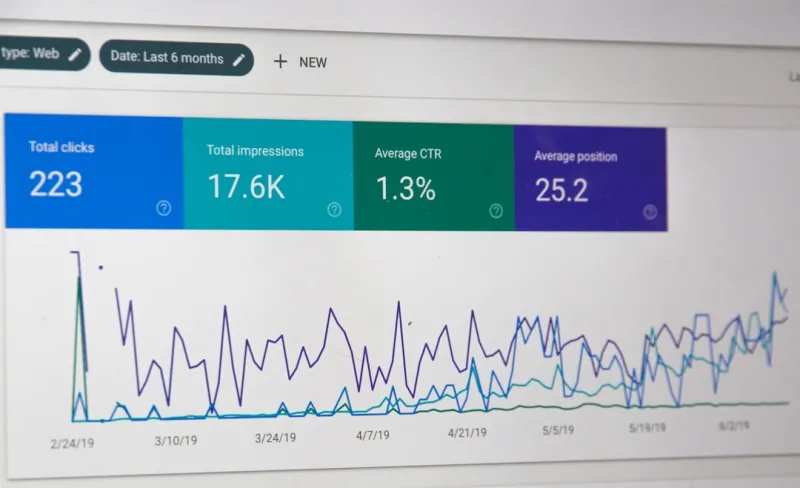
Start with a content audit. Pull data from Google Search Console’s Performance > Discover tab (if you have it enabled) and note which pages already get impressions. For those without any Discover data, look for:
- Industry reports with fresh data (e.g., quarterly SaaS benchmarks).
- Thought‑leadership pieces that answer emerging questions (“What is the future of AI‑augmented CRM?”).
- Practical how‑to guides that solve a specific pain point (“How to migrate from legacy ERP to a cloud‑native platform”).
When brainstorming new topics, tap into Google Trends, Reddit SaaS communities, and LinkedIn Pulse to surface the language your audience uses. Remember: Discover loves fresh angles on familiar problems.
2. Craft Content That Feels Personal, Not Promotional
Unlike a typical landing page, Discover content should read like a conversation. Use storytelling techniques:
- Hook in the first 40 words—pose a question or present a surprising statistic.
- Humanize the narrative—share a brief customer anecdote or a behind‑the‑scenes look at your product development.
- Actionable takeaway—end with a concise bullet list that readers can implement right away.
Embedding relevant Schema Superpowers for B2B SaaS SEO can also help Google understand the content type (article, FAQ, How‑To) and improve the chances of a rich card appearing in Discover.
3. Optimize for Mobile First (Again)
Discover is predominantly a mobile experience. Even though we recently covered mobile‑first SEO, the stakes are higher here because the feed’s UI is highly visual. Ensure:
- Responsive images that load quickly (srcset and lazy loading).
- Text that is legible without zooming—use a base font size of at least 16px.
- Tap‑friendly calls‑to‑action with a minimum touch target of 48 dp.
Google’s Core Web Vitals—LCP, FID, CLS—remain the health check for any Discover‑eligible page.
4. Leverage Structured Data Thoughtfully
While you might be tempted to overload a page with schema, Google favors clarity. For Discover, the most beneficial types are:
- Article schema with
datePublishedandauthorfields. - FAQ schema for posts that answer common SaaS queries.
- HowTo schema for step‑by‑step guides.
These not only help with traditional SERP features but also give Google more context for the feed’s recommendation engine.
5. Promote Engagement Signals
Discover’s algorithm watches how users interact with your content. Boost those signals by:
- Adding related article widgets at the end of each post (keep them relevant and not overly promotional).
- Embedding short, native‑format videos that autoplay muted—videos increase dwell time dramatically.
- Encouraging social shares with a subtle “If you found this useful, share it with your network” line.
Even a modest uptick in CTR (from 2% to 3%) can signal to Google that the content is valuable, feeding a positive feedback loop.
6. Monitor, Iterate, and Scale
Set up a monthly dashboard in Google Data Studio pulling:
- Discover impressions, clicks, and average position.
- Engagement metrics: average session duration, scroll depth, and exit rate.
- Conversion paths: how many Discover visitors convert to trial sign‑ups or demo requests.
When a piece spikes, reverse‑engineer the success: Was it a trending topic? A compelling headline? A viral social share? Feed those insights back into your editorial calendar.
Case Study: Turning a Quarterly Report Into a Discover Magnet
One of our SaaS clients—an AI‑driven analytics platform—had a yearly “State of Predictive Marketing” report that traditionally performed modestly in organic search. We applied the Discover playbook:
- Re‑wrote the executive summary as a story about “How 73% of marketers missed the next wave of AI adoption.”
- Added semantic topic clusters around AI adoption, predictive modeling, and data hygiene.
- Implemented Article schema with a clear
imageanddateModifiedto signal freshness. - Created an engaging infographic that loaded lazily and was mobile‑optimized.
Within three weeks, the report appeared in Discover for users interested in AI and marketing tech, generating a 4.2× lift in qualified traffic and a 27% increase in trial sign‑ups directly attributable to the feed.
Common Pitfalls—and How to Avoid Them
- Over‑optimizing headlines: Click‑bait may boost CTR short‑term but can increase bounce rates, harming long‑term eligibility.
- Neglecting evergreen updates: Even evergreen pieces need periodic refreshes—new data, updated screenshots, fresh quotes.
- Ignoring the “no‑ads” rule: Discover prefers ad‑free experiences. Keep interstitials and pop‑ups to a minimum.
- Skipping image alt text: While Discover is visual, alt text still informs the algorithm about relevance.
Future‑Proofing Your Discover Strategy
Google is constantly iterating on the feed. Here’s how to stay ahead:
- Watch for UI changes: When Google introduces new card formats (e.g., carousel vs. single‑card), adapt your visuals accordingly.
- Experiment with Google’s Search Generative Experience (SGE): Though still emerging, SGE will likely blend traditional SERP and Discover signals.
- Leverage user‑generated content: Encouraging customers to share their success stories can add fresh, authentic signals that the algorithm loves.
In short, Google Discover is not a passing fad; it’s an evolving, audience‑first channel that rewards relevance, freshness, and genuine value. By treating your SaaS content as a conversation rather than a sales pitch, you can turn the feed into a reliable, high‑intent traffic source.
Takeaway Checklist
- Identify trending, problem‑centric topics with a Discover lens.
- Write in a story‑driven, mobile‑first style.
- Apply clean Article or HowTo schema.
- Optimize images for speed and visual appeal.
- Boost engagement with related content and native video.
- Track Discover metrics and iterate monthly.
Ready to give Discover a try? Start with one piece of content, apply the steps above, and watch the feed work its magic.

Nikki McDonald is a freelancer based in Waterloo. She brings her skills and expertise to various projects, balancing her professional work with a personal life that includes her husband, Stewart.
Related Posts

Beyond Borders: A SaaS Guide to International SEO Mastery
Discover a data‑driven framework for SaaS international SEO, from market prioritization and authen... Read More
Google SEO in 2024: Kelly Reynolds’ Insider Forecast
Kelly Reynolds reveals the 2024 Google SEO playbook: mastering E‑E‑A‑T, mobile‑first, highâ€... Read More

Unlocking Google’s AI Answer Boxes: A Fresh SEO Playbook
Discover a practical roadmap to capture Google’s AI‑generated answer boxes using topic clusters,... Read More
Top Posts

Backlink Strategy Reinvented: Interactive Tools That Earn Real Authority
Traditional guest posts are losing impact. This post reveals a fresh backlink approach for SaaS—building interactive calculators, widgets, and data‑driven o...Read More

Scaling Technical SEO for Multi‑Tenant SaaS: A Playbook to Tame Duplicate Content and Crawl Limits
A detailed guide for SaaS teams on handling the unique technical SEO challenges of multi‑tenant platforms, covering architecture decisions, canonicals, struct...Read More

Mobile SEO Mastery in 2024: Tom Ferguson’s Insider Playbook
Tom Ferguson breaks down the 2024 mobile SEO landscape, sharing actionable tips on speed, structured data, voice search, and link building to dominate mobile SE...Read More

How AI-Powered Visual Search Is Redefining the Online Shopping Experience
Visual search turns images into purchase pathways, cutting friction and raising conversion rates. Learn how AI, user experience design, and data integration mak...Read More
0 Comments
Post Comment
You will need to Login or Register to comment on this post!