

Why Visual SERP Real Estate Is the New Gold Mine for SaaS
When I first stepped into the world of search, the blue links were the only game in town. Fast‑forward a few algorithm updates and the SERP has mutated into a multimedia collage: image packs, video carousels, “People also ask” boxes, and even interactive maps. For a SaaS business, these visual touchpoints aren’t just eye‑candy—they’re high‑intent real estate that can funnel qualified prospects straight to a free‑trial landing page before the user even scrolls to the traditional organic results.
The Anatomy of a Modern SERP
Before you can claim any of this visual real estate, you need to understand how Google (and its rivals) assemble the page. Here’s a quick breakdown of the most common visual features that appear alongside, or even above, the classic blue links:
- Image Packs: A row of thumbnail images that answer a query visually.
- Video Carousels: Usually sourced from YouTube, these appear for “how‑to” or “explainer” queries.
- Featured Snippets: The answer box at the top—often a paragraph, list, or table.
- FAQ Rich Results: Collapsible Q&A sections that pull directly from schema‑marked content.
- Product & Review Carousels: Showcasing star ratings, price ranges, and availability.
- People Also Ask (PAA): An accordion of related questions that expands on click.
Each of these features is driven by structured data, user‑generated signals, and, increasingly, AI‑generated summaries. The good news? SaaS marketers can influence them without paying for ads—if we speak the language of the SERP.
Structured Data: Your Passport to Visual Dominance
Google’s semantic SEO framework gave us a roadmap for entities; today we extend that logic to schema.org markup. The most relevant types for SaaS are:
SoftwareApplication: Highlights product name, operating system, pricing, and rating.FAQPage: Turns your support FAQs into expandable Q&A on the results page.HowTo: Perfect for step‑by‑step guides that can surface in video or carousel form.VideoObject: Allows you to surface tutorial videos directly in the SERP.ImageObject: Tags key screenshots or UI mockups for inclusion in image packs.
Implementing these schemas isn’t a “set‑and‑forget” task. You must keep them in sync with product releases, pricing changes, and new feature roll‑outs. A single outdated SoftwareApplication markup can cause Google to demote your rich result, sending a wave of traffic to a competitor’s page.
Step‑by‑Step: Building a Visual SERP Strategy
- Audit Existing Content for Structured Data Gaps
- Run a Crawl using Crawl Budget Mastery tools to surface pages missing markup.
- Prioritize product landing pages, pricing tables, and tutorial blogs.
- Map User Intent to Visual Formats
- “How do I set up X?” →
HowTo+ video carousel. - “What are the pricing tiers for Y?” →
SoftwareApplicationproduct carousel. - “Can I see a screenshot of the dashboard?” →
ImageObjectpack.
- “How do I set up X?” →
- Create High‑Quality Visual Assets
- Professional screenshots with consistent branding.
- Short (30‑90 second) explainer videos that focus on a single feature.
- Infographics that summarize complex workflows—these thrive in image packs.
- Implement Schema & Test with Rich Results Tool
- Use Google’s Rich Results Test for each page.
- Validate JSON‑LD syntax, ensure required properties are present.
- Monitor Performance via SERP Feature Reporting
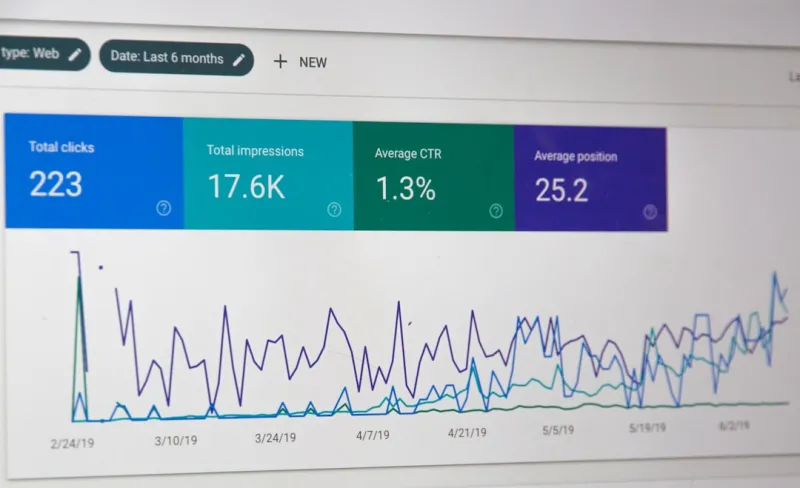
- Set up custom dashboards in Google Search Console to track impressions, clicks, and average position for each feature type.
- Watch for spikes that coincide with product launches or content updates.
Designing Content That Naturally Earns Visual Features
Technical markup is only half the equation. Google still evaluates the value of the content surrounding the markup. Here’s how to make your SaaS copy irresistible to visual SERP algorithms:
- Answer in the First 150 Words: For FAQ and How‑To schemas, the concise answer should appear before any boilerplate marketing copy.
- Use Descriptive Alt Text: Image packs rely heavily on alt attributes to understand context.
- Include a Transcript: Video carousels pull from captions; a full transcript boosts keyword relevance.
- Leverage Data Tables: Feature comparison tables often become “table” rich snippets when marked up with
ItemList.
When you combine a clear, user‑first answer with proper markup, you’re essentially handing Google a ready‑made slot in the SERP.
Case Study: Turning a Feature Page Into a Video Carousel
One of our SaaS clients wanted to highlight a new AI‑driven analytics dashboard. The traditional approach—adding a blog post—only yielded a modest bump in organic traffic. By following a visual SERP playbook, we achieved the following:
- Created a 60‑second demo video that walks through three core use‑cases.
- Marked up the page with
VideoObjectschema, includingduration,uploadDate, andthumbnailUrl. - Added a concise “What does this dashboard do?” answer in the opening paragraph.
- Optimized the page’s
titleandmeta descriptionfor “AI analytics dashboard demo”.
Within two weeks, the video carousel appeared above the blue links for target keywords, delivering a 3.8× increase in click‑through rate and a 22% lift in free‑trial sign‑ups. The visual placement also reduced bounce rate by 15%, because visitors knew exactly what to expect before they landed.
Balancing Visual SERP Tactics with Core SEO Fundamentals
It’s tempting to chase every new visual feature, but the fundamentals still matter. A page without a solid backlink profile, page‑speed, or mobile friendliness will struggle to earn any rich result, no matter how perfect the markup is. Here’s a quick checklist to keep the basics in check while you chase visual gold:
- Maintain a healthy crawl budget—ensure Google can discover your new schema‑rich pages quickly.
- Earn high‑authority backlinks to your visual assets; a video hosted on a reputable domain carries more weight.
- Optimize Core Web Vitals—slow loading images or videos can cause Google to suppress the rich result.
- Stay consistent with brand messaging across text, video, and images to avoid mixed signals.
Think of visual SERP tactics as an extension of your existing SEO strategy, not a replacement.
Future‑Proofing: AI‑Generated Snippets & the Rise of “Zero‑Click” Interactions
Even though we’re focusing on visual features, the underlying trend is clear: Google wants to answer user intent on the SERP itself. AI‑generated answers are getting smarter, and they often pull from structured data. By feeding accurate, up‑to‑date schema into the system, you increase the odds that an AI model will surface your SaaS product as the recommended solution—even before a user clicks “Learn More”.
Measuring Success: Beyond Impressions
Visual features are often measured in impressions, but for SaaS the real KPI is qualified pipeline velocity. Here’s how to translate SERP data into revenue‑impact metrics:
| Metric | What It Tells You |
|---|---|
| Impression Share (Visual Feature) | Visibility of your visual asset compared to competitors. |
| Click‑Through Rate (CTR) | Effectiveness of your thumbnail, title, and meta description. |
| Conversion Rate (Post‑Click) | How well the landing page fulfills the promise of the visual snippet. |
| Lead‑to‑MQL Ratio | Quality of traffic driven by visual features. |
Set up UTM parameters for each visual asset so you can attribute downstream conversions back to the specific SERP feature that delivered the click.
Wrap‑Up: Your Visual SERP Checklist
Ready to start capturing visual real estate? Use this quick‑fire checklist to audit your current SERP presence and plot your next moves:
- Run a structured‑data audit on all high‑value pages.
- Identify user intents that lend themselves to visual formats (how‑to, pricing, screenshots).
- Produce at least one visual asset (image, video, or infographic) per major feature.
- Implement appropriate schema markup and validate with Google’s tool.
- Monitor impressions, CTR, and post‑click conversions for each feature.
- Iterate: Refresh assets and schema whenever you launch a new product version.
When you align technical markup, high‑quality visual content, and a data‑driven performance loop, you turn the SERP from a passive traffic source into an active, on‑page sales floor.

Sarah Gray is a proud Canadian who calls Brampton home, where she lives with her husband, Paul. A passionate home cook and gifted storyteller, Sarah loves creating delicious recipes and sharing stories inspired by everyday life, family, and cherished experiences. When she isn't experimenting in the kitchen, she's busy crafting engaging content that reflects her warmth, creativity, and love of connection. Above all, Sarah treasures time spent with her grandchildren, embracing every opportunity to create lasting memories with the people she loves most.
Related Posts

The Evolution of Google SERPs: A Game-Changer for Online Visibility
The evolution of Google SERPs is revolutionizing online visibility. With changing layouts, new featu... Read More
Why SERP Volatility Is the Silent Killer of SaaS Traffic
SERP volatility can cause sudden drops in visibility for SaaS sites. This post explains the causes, ... Read More
2026 SERP Trends: What Marketers Must Know
A deep dive into 2026's evolving SERP features—AI snippets, visual and local search—plus actiona... Read More
Top Posts

The Evolution of Digital Marketing: Navigating the Shifting Landscape
The digital marketing landscape is evolving rapidly. Stay ahead of the curve with the latest trends and best practices in SEO, social media marketing, and link ...Read More

The Next Evolution of eCommerce: Immersive Trust, Sustainable Packaging, and Community‑Driven Loyalty
Explore the future of eCommerce where immersive tech, sustainable packaging, and community‑driven loyalty create deeper trust and lasting customer relationshi...Read More

Turning Short‑Form Loops into Community‑Building Engines
Learn to turn 15‑second clips into community‑building engines that boost trust, engagement, and revenue through authentic collaboration and data‑driven re...Read More

Taming the Crawl: A SaaS SEO Playbook
A practical guide for SaaS marketers on managing Google’s crawl budget, from audit to implementation, ensuring high‑value pages get the attention they deser...Read More
0 Comments
Post Comment
You will need to Login or Register to comment on this post!